
The Ultimate Checklist for Your Business Localization Strategy
You are looking to sell your products in other countries, whether directly or through a distributor. Your products are popular in the United States and you believe there is a market for them overseas. In fact, there is data that confirms your beliefs. You’ve also heard the word Localization and maybe saw other companies “localizing” their content, but may not fully understand how it works.
In order for your business to succeed in other countries, you must have a documented localization strategy. What I will do is show you some of the things you can add to your strategy that will set you up for success.
Importance of Localization
Why localize your business content anyway? It seems like a costly endeavor. You might be thinking that you can just provide your content in English and succeed, right?
That thought process will not set you up for success, and I will prove it to you.
Here is how.
I recently went to Cabo San Lucas, Mexico for vacation, a wonderful destination to relax and enjoy some sunshine on the beach. My proficiency in Spanish is mediocre at best, so communicating with the locals proved to be a challenge and at times a frustrating experience. Thankfully, many locals in Cabo San Lucas speak a bit of English since it’s such a popular destination for U.S. tourists.
I went to purchase some goods at a local convenience store, including sunscreen, trail mix and other items that I charged to a credit card. When I looked at the receipt I was shocked. The total shown on the receipt was $300. I only bought a few things, how can the total price be that much?
I later realized that the currency displayed was in Mexican Pesos, not U.S. Dollars, even though the $ was shown on the receipt. Understanding that put me at ease, although it wasn’t immediately clear whether the charge was in pesos or in dollars.
Luckily, I also know how to use sunscreen since the directions on the tube were not of any use to me, since they were in Spanish. I can only read some Spanish, but not enough to understand the specifics.

The trail mix that I bought contained a variety of nuts. The package included a nutrition information label, and possibly allergen information as well. Even though I was not allergic to any ingredient in that trail mix, it would have been nice to see allergen information in Spanish as well as in English, since it’s sold to consumers who speak both languages, and food allergies can be life-threatening.
Overall, this made me think of the importance of localization, because as a consumer I was going through a confusing customer experience.
Now, imagine someone buying your product in Mexico that was manufactured in the U.S. and you are expecting them to read the user manual in English. The customer experience will be equally as confusing, and if your product is not intuitive to use, you risk losing that customer for good. And who wants to lose customers? I am sure you don’t.
Checklist Items for Your Localization Strategy
As a business looking to expand overseas, what do you localize? Here are some essential items to include in your localization strategy.
1. Country
When you are looking to localize your content for a specific locale, there is no better example than the country you are localizing for. After all, the country is the location you are targeting. A good example of such localization is for the Spanish language. Spanish is the official language of Spain and is also spoken in many other countries around the world, including Mexico, Argentina and the United States.
Last thing you want to do is have your content translated into Spanish intended for audience from Spain and then distribute it in Mexico. You will create a poor customer experience for the consumers in Mexico, because the dialect of Spanish there is unique to the country and culture.
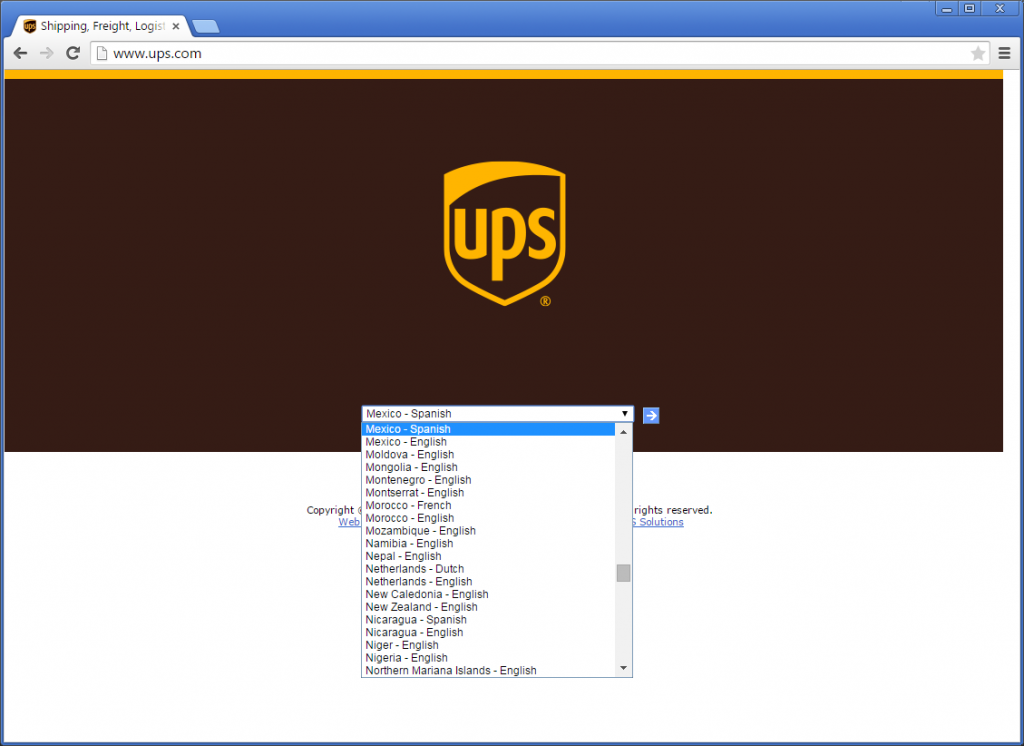
Another example includes countries where multiple languages are spoken, such as Kazakhstan, where Kazakh and Russian are both official languages. You will have a group of consumers that only understand one or the other, not necessarily both.
2. Language
Language translation is perhaps the most important aspect of your localization strategy. When you are expanding into a specific market, you must understand the language of your customers.
A good approach in this case would be to identify the official language or languages in the country you are looking to sell in. For example, in Germany the official language is German. With over 95% of the population speaking German, you are in pretty good shape translating your content into German for that specific market.
3. Units
United States remains one of the few countries that don’t use the metric system for measuring units. In other words, when doing business in Mexico or other countries, have a unit conversion calculator handy.
Units to consider include length, area, volume, temperature, mass and weight. Think miles to kilometers and pounds to kilograms conversion.
One important consideration is to tie the units to the locale you are targeting and not to the language you are translating into. This is because different countries display units in different formats.
For example, if your content is translated for the Spanish-speaking population in Portland, Oregon, the translation will be in Spanish, but the units may be displayed according to U.S.-standards.
4. Date & Time
The way date and time are displayed differ from country to country.
For example, 5/12/15 (mm/dd/yy) is understood as May 12, 2015 in the United States. In many other countries, it would be understood as December 5, 2015 since the local date format is (dd/mm/yy).
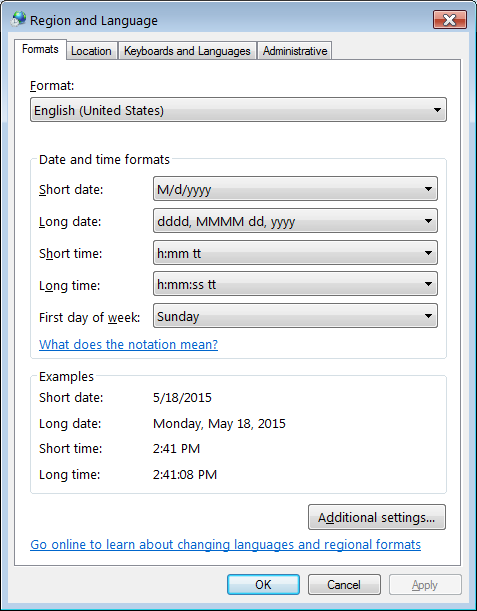
This is an important detail, especially for legal documents such as contracts and financial statements.
5. Currency
When doing business in other countries, be ready for financial transactions using the local currency. If you are selling your products on the internet, display prices in the currency of the countries you are targeting.

If you are selling something to consumers in Mexico, and display prices in U.S. Dollars, you will cause confusion.
6. Colors
Color psychology plays a huge role in determining how consumers perceive your brand. What may work well in the U.S. market, could have negative effects in China and other countries.

Source: The Logo Company
Be prepared have separate brand identities that are localized to specific cultures. This could mean going away from your corporate color scheme.
7. Logo & Slogan
Your logo and slogan are closely related to the colors you use in your brand. Your logo and slogan may have to be adapted to the country you are doing business in. There are many companies that do this successfully, including Coca-Cola.

Source: Globalmarketingculture.com
Again, you want to do this so you don’t offend your target audience and lose their business. When you do it right, you will only gain their trust and establish yourself as a reputable brand.
8. Local Presence & Customer Service
One of the best things you can do for your business is having local representation in your target market. Preferably, the persons representing you are familiar with the local language, culture and customs. It will make customer interaction a lot easier.
Of course, local presence may not be an option for all businesses due to cost associated with it. Alternatively, you can provide customer service in your customers’ language, whether online or by telephone. If you do it by telephone, you can establish an agreement with a telephonic interpreting service provider or hire bilingual staff.
9. In-Country Review
A friend recently told me a story about a project his company completed for a multinational manufacturer headquartered in Germany, with production facilities in Poland. The project scope was to “fix” the translations another company completed.
The translations included training and human resources materials for factory workers in Poland. The problem was, that those materials were not well received by the factory workers and didn’t provide the desired results the manufacturer expected.
The reason was that the content was translated for a more sophisticated audience, such as business executives. When the factory workers read it, they found it offensive and felt like they were being talked down to. The translation was simply not the right fit for the target audience.
As part of the fix, my friend’s company hired a team of subject-matter experts in Poland to help localize the translated content in a way which was not offensive to the factory workers. This included in-country review and feedback by a few select workers. With the feedback in mind, changes were implemented in the translated content.
The result was a much more successful training and human resources program that yielded desired results.
Conclusion
You’ve now learned about several aspects of localization and what to include in your business localization strategy.
To position your business for success, you must communicate with your target audience in their language. If they can’t understand your message, they won’t buy from your company.
One way to do this is to translate and localize your business content. And now you have a checklist to help you with your business localization strategy.
Please share your localization story in the comments.